Modra app icon Modra 0.5 · Open Up

Design it. Price it.
Build it.

Modra is parametric 3D CAD from the Mostly Built garage. It doesn't stop at the model: it tells you what your part will cost, how it'll be made, what lumber to buy and where it's going to fail. Your designs live on your computer, not someone's cloud.

Free foreverLocal .modra filesNo accountWorks offlineBuilt in Rust
Sketch fully defined · 0 DOF
Make It · $1,063 a table in a batch of 10
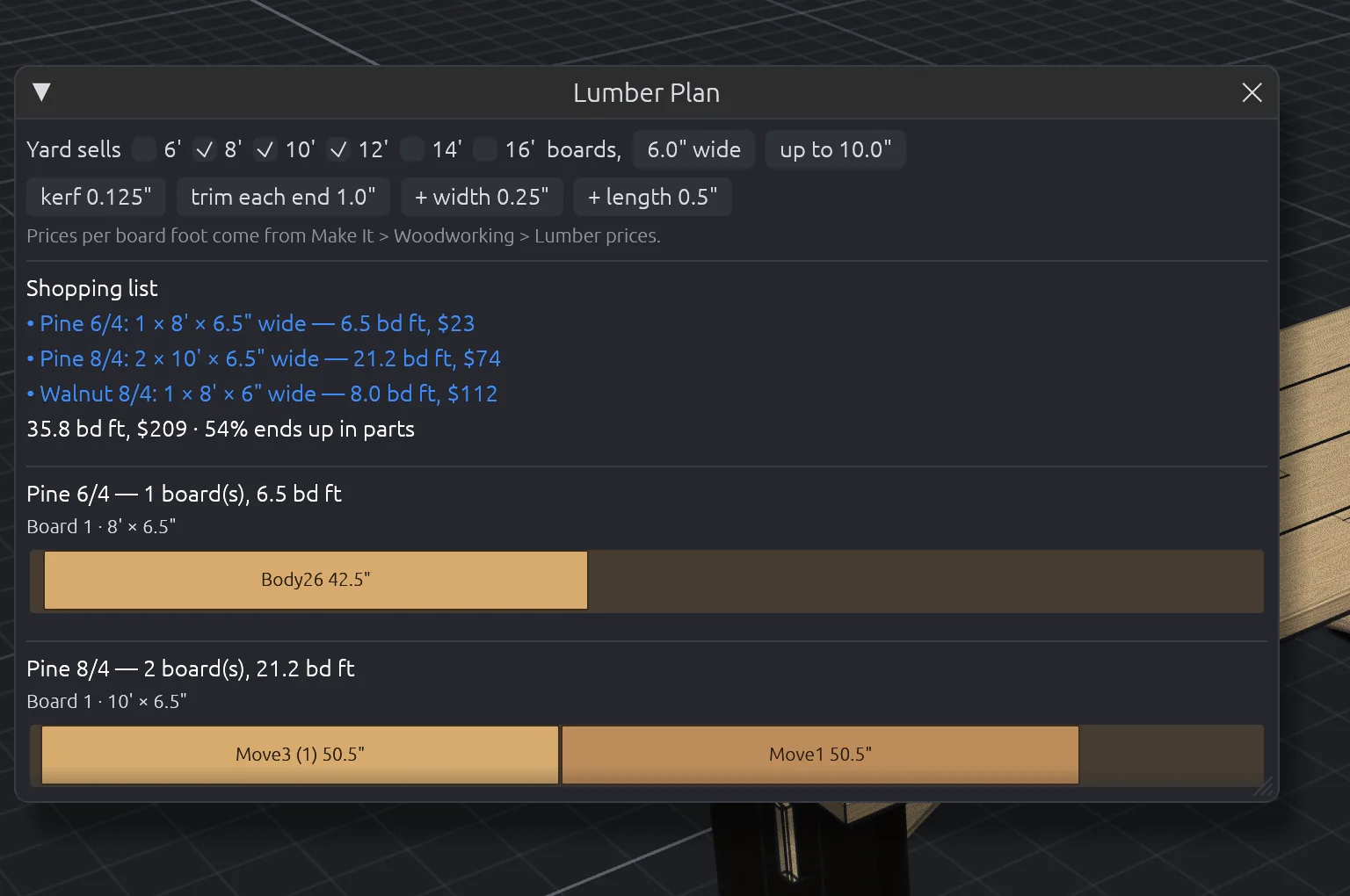
Lumber · 35.8 bd ft on 4 boards
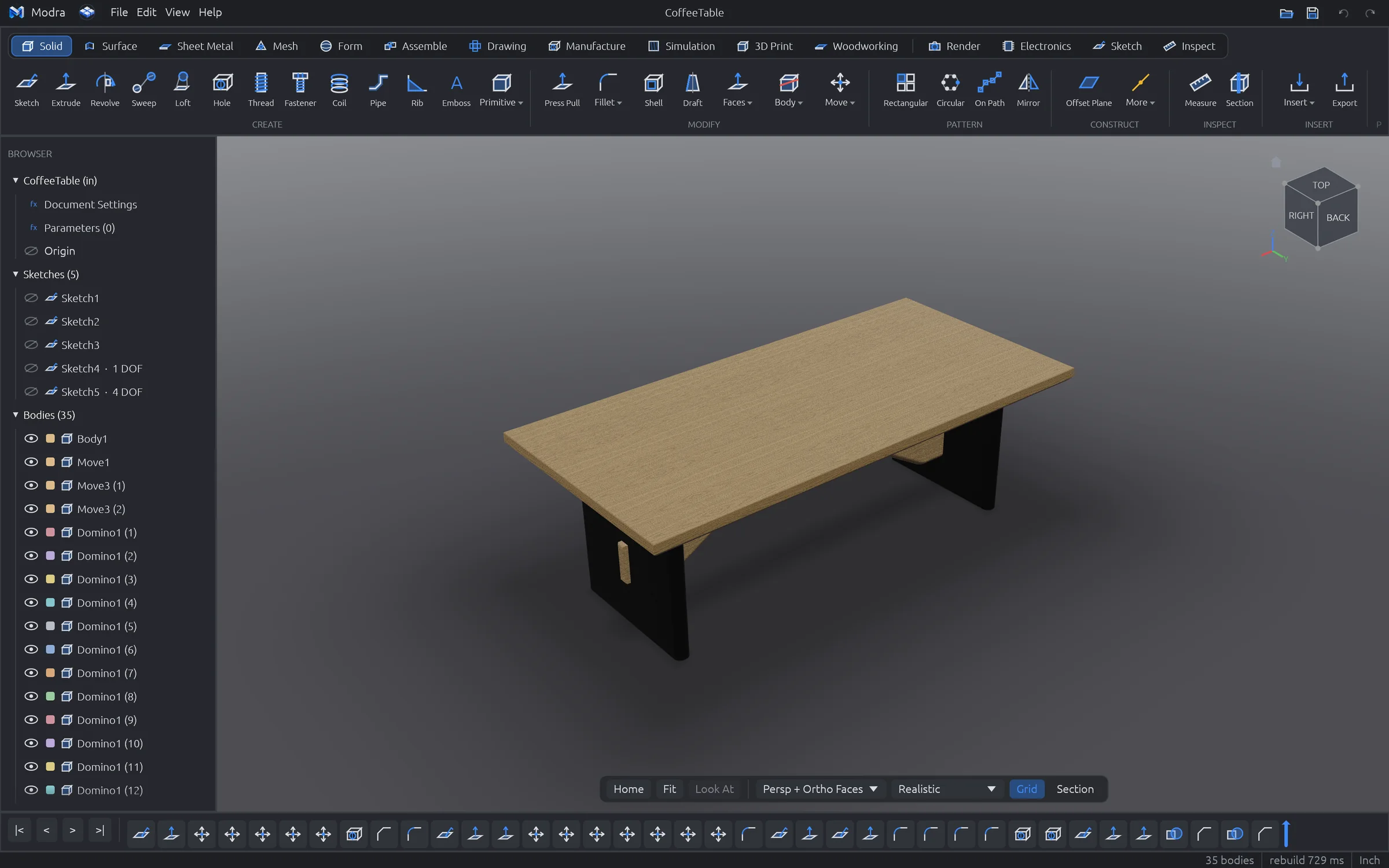
CoffeeTable — Modra
Modra showing a walnut and pine coffee table in the realistic display mode, with the feature timeline and body browser
97
modeling commands
43
sketch tools
15
workspaces, one app
199
automated tests per build
Why Modra

CAD that thinks past the screen.

Most CAD stops when the model looks right. Modra keeps going, because the hard part of a build is everything after the model.

Your files, your computer

Free, with your designs as plain .modra files on your own disk. No login, no subscription, no cloud that holds your work hostage. It even works on a laptop in the shop with no Wi-Fi.

Knows how it gets made

Instant cost and manufacturability for CNC, 3D printing, sheet metal, moulding and woodworking. Costed bills of materials, lumber plans and tolerance stack-ups, built in.

Sketch to shop floor

Model it, draw it, simulate it, then send it out: DXF for the laser, G-code for the CNC, STLs for the printer, a project packet for the bench. One app, one file.

Capabilities

Everything between the idea and the sawdust.

Every screenshot here is Modra exactly as it ships. No mock-ups.

01 / Sketch

A sketcher that fixes itself.

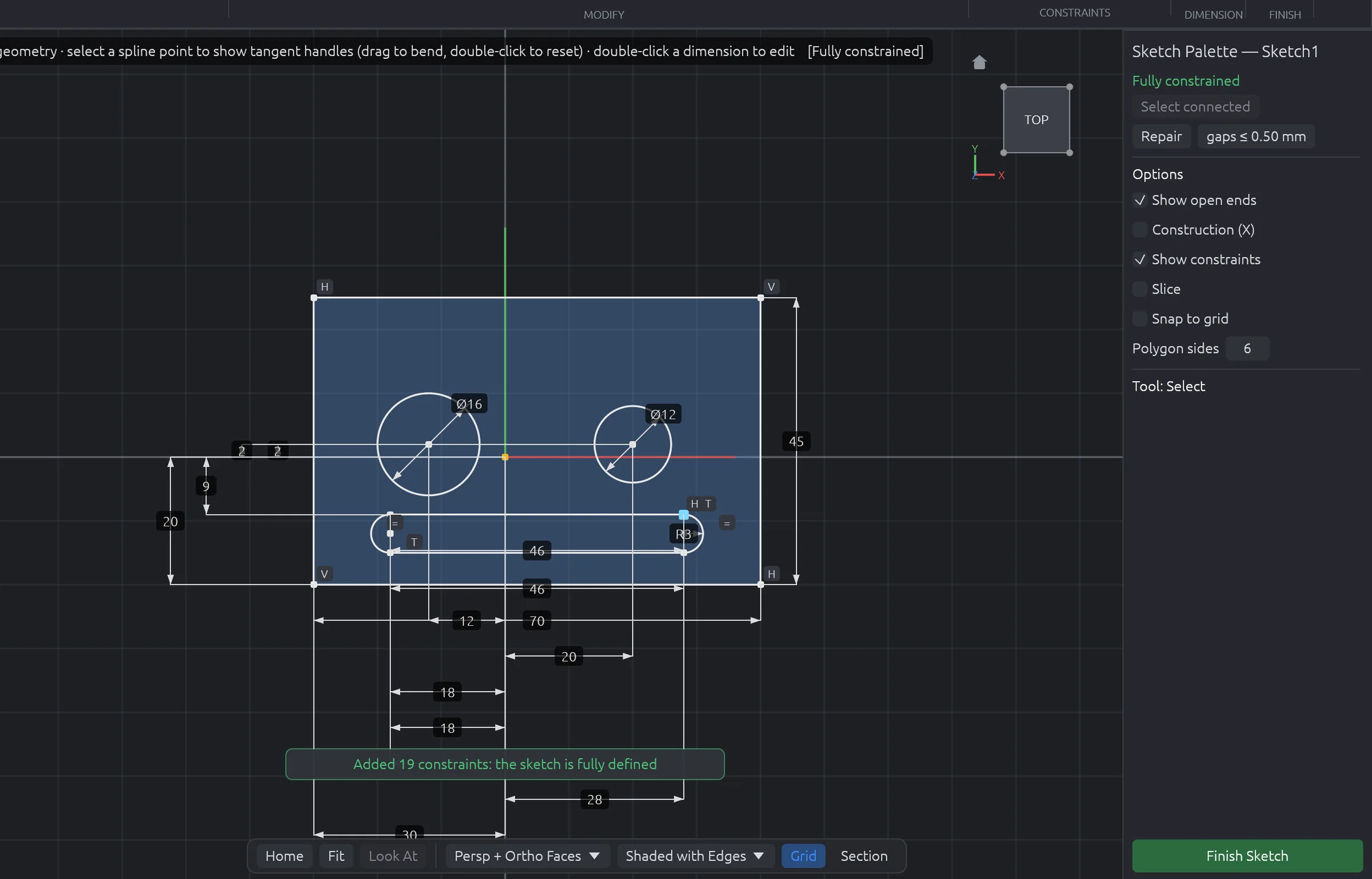
A real constraint solver under 43 tools: lines, arcs, splines, conics, slots, polygons, text, offsets and patterns. Then the part other CAD leaves to you: one click adds every missing dimension and relation without moving a thing.

  • Fully define any sketch in one click, with nothing over-constrained
  • Open ends glow red, and Repair closes the gaps, tiny slivers and doubled lines
  • Live degrees of freedom, colour-coded geometry, drag with constraints
  • Driving and reference dimensions with unit-aware expressions
Sketch1 — fully constrained
A sketch of a plate with two holes and a slot, fully dimensioned automatically by Fully Define
02 / Make It

Know the price before you press print.

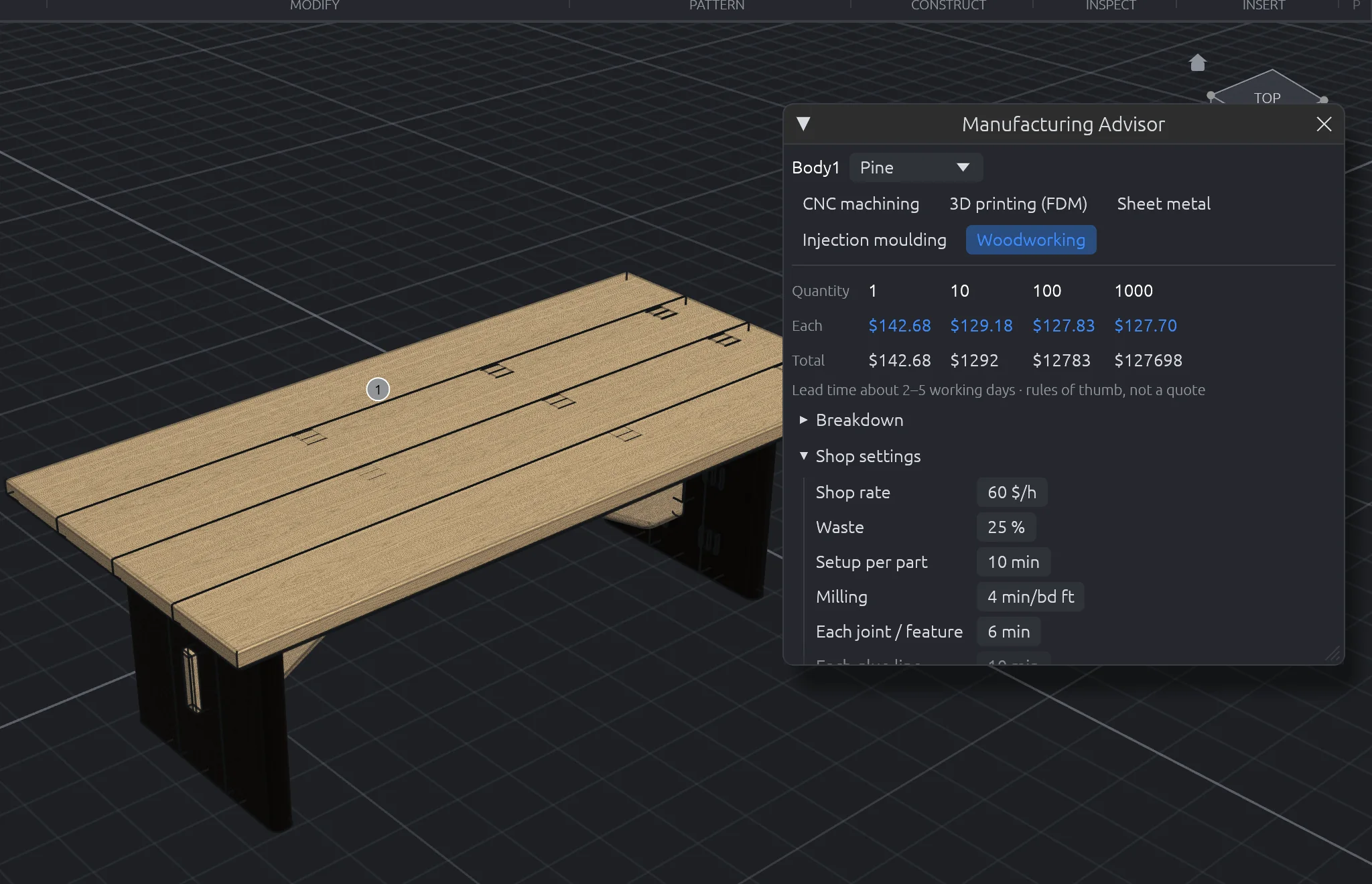
Pick a process and Make It answers on the spot: price at 1, 10, 100 and 1,000 parts, lead time, and the problems that will bite you, marked right on the model. Woodworkers get board feet, milling, joinery, sanding by area and finish by coat, from your own shop rates.

  • CNC, 3D printing, laser sheet metal, injection moulding and woodworking
  • Thin walls, deep holes, sharp corners, missing draft and overhangs flagged
  • Costed BOM rolls every part up to a price per assembly
  • Seasonal wood movement for every solid-wood part
Manufacturing Advisor — Woodworking
The Manufacturing Advisor pricing a pine tabletop board for woodworking, with shop settings
03 / Drawings

Drawings that dimension themselves.

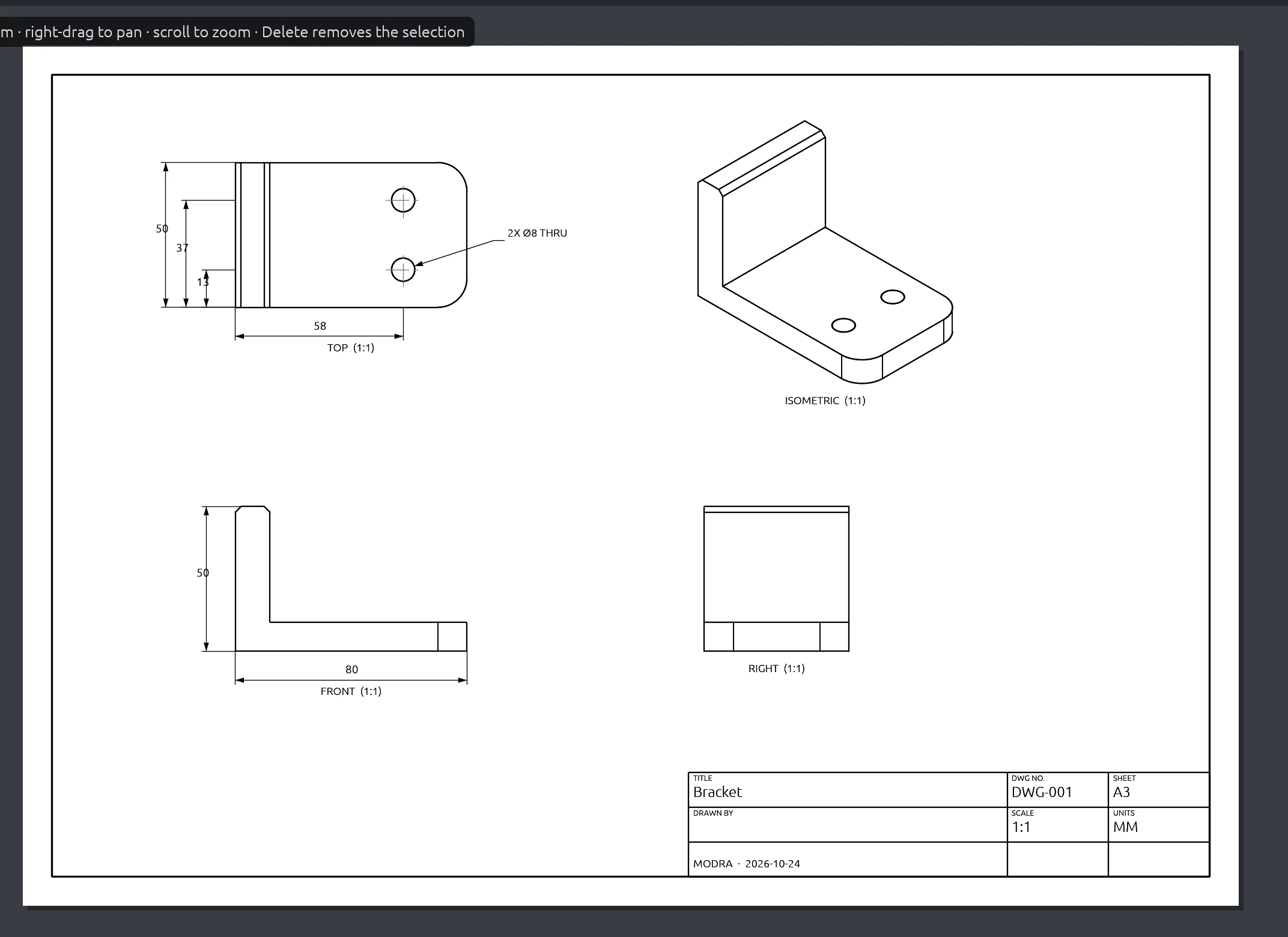
Hidden-line views, sections and details from the model. Auto Dimension adds overall sizes, hole callouts and positions to every view without doubling up, and every dimension follows the model when a parameter changes.

  • Auto dimensions, hole callouts (C'BORE, CSK, thread, THRU) and balloons
  • GD&T frames, datums and tolerances, plus a parts list
  • Tolerance stack-up: worst case and statistical, with the dimension to tighten
  • Export PDF, SVG and DXF
Bracket — Drawing
A drawing sheet of a bracket with top, front, right and isometric views, dimensioned automatically
04 / Simulate

Find the weak spot before the part does.

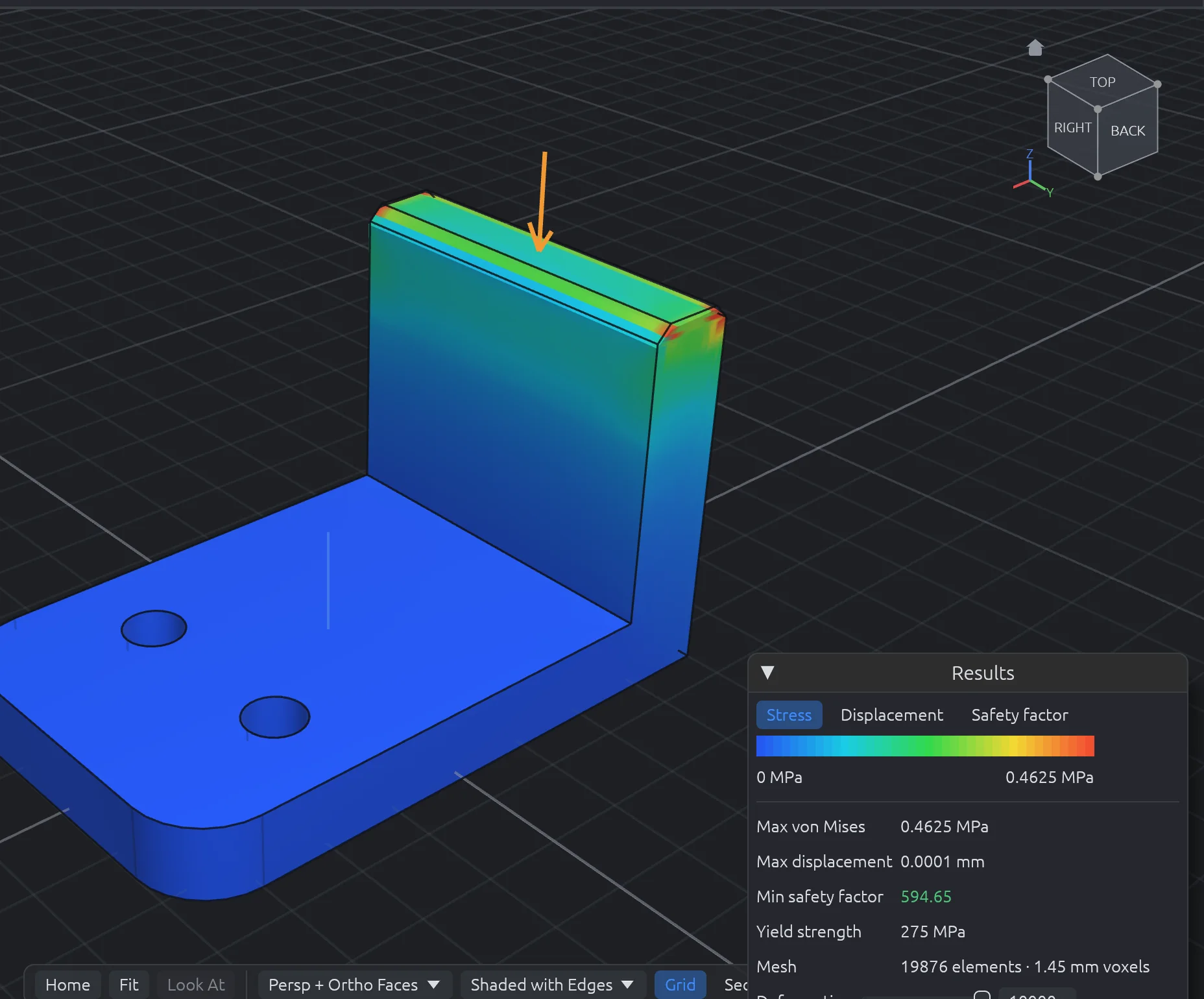
Static stress, natural frequencies and heat flow, solved on your machine in seconds. Pin a face, push on another, and read stress, displacement and safety factor in colour on the part.

  • Static stress with von Mises, displacement and safety-factor maps
  • Modal frequencies with animated mode shapes
  • Steady-state thermal with temperature maps
Bracket — Static stress
A bracket coloured by von Mises stress, with the results panel showing max stress and safety factor
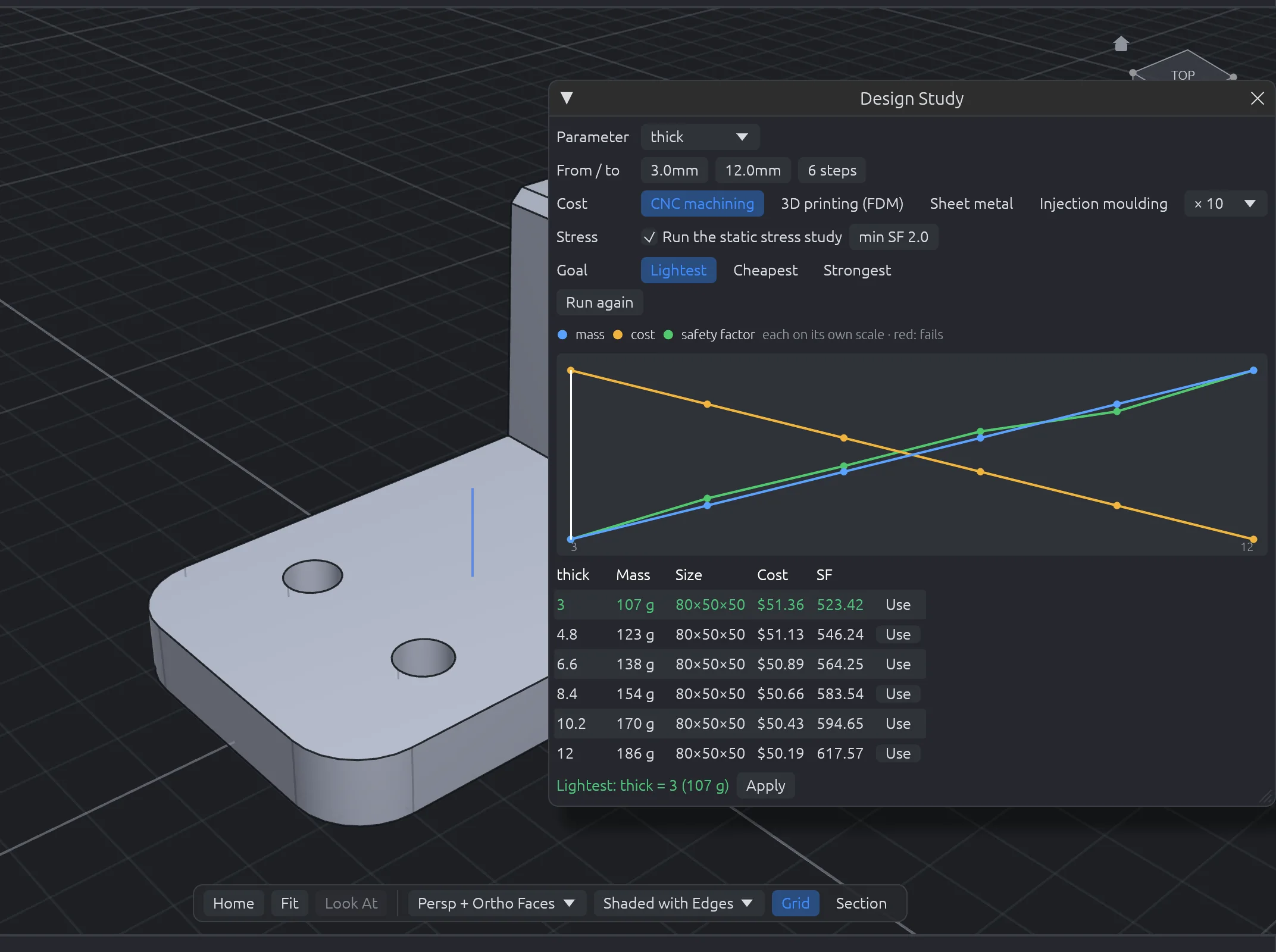
05 / Design Study

Let the numbers pick the design.

Sweep any parameter across a range. Modra rebuilds each version in the background and charts mass, cost and safety factor, then picks the lightest, cheapest or strongest version that still passes. One click applies it.

  • Mass, size and cost per part at your batch size
  • Stress and safety factor at every step, with failures marked
  • Compare Versions shows what changed since any save or edit
Design Study — plate thickness
The Design Study window charting mass, cost and safety factor against plate thickness
06 / Woodworking

Built by a woodworker, for the shop.

Boards from your stock list and real joinery: dovetails, box joints, mortise and tenon, dados, pocket holes, dowels, dominos and biscuits. Generators for cabinets and drawers. Then a lumber plan that tells you exactly which boards to buy and how to cut them.

  • Lumber Plan: shopping list by species and thickness, with to-scale cutting diagrams
  • Project Packet: a shop-ready PDF with cut list, diagrams, hardware and cost
  • Cut list, sheet nesting for CNC, edge banding and hardware boring
Lumber Plan — CoffeeTable
The Lumber Plan window with a shopping list and cutting diagrams for pine and walnut boards
15 workspaces

One app for every kind of build.

Switch tabs, not programs. Every workspace shares the same model, timeline and file.

Solid

Extrude, revolve, sweep, loft, fillet, shell, patterns.

Sketch

43 tools and a live constraint solver.

Surface

Patch, ruled, offset, trim, stitch, thicken.

Sheet Metal

Flanges, hems, flat patterns, bend order, nesting.

Mesh

Repair, reduce, remesh and convert STL scans.

Form

Subdivision modelling for organic shapes.

Assemble

Components, joints, limits and motion.

Drawing

Views, auto dimensions, GD&T, parts lists.

Inspect

Measure, check, study, compare, stack-up.

Manufacture

CAM pockets, contours, drilling and G-code.

Simulation

Stress, modal and thermal studies.

3D Print

Orient, split for print, overhangs, 3MF.

Woodworking

Joinery, cabinets, lumber plans, packets.

Render

Materials, decals and photoreal scenes.

Electronics

Schematics, PCBs, KiCad import, enclosures.

Built in, not bolted on

The tools you'd normally buy separately.

In most professional CAD, these live in premium tiers, add-ons, spreadsheets or a different program. In Modra they're part of the app.

CapabilityModraTypical professional CAD
PriceFree, foreverUsually a yearly subscription
Files stored locally, works fully offlineAlwaysOften cloud-first or tied to an account
Instant cost & manufacturability for five processesBuilt inAdd-on or a separate quoting service
Costed bill of materials per assemblyBuilt inUsually a spreadsheet
Parameter sweeps with stress and safety factorBuilt inUsually a premium simulation tier
Tolerance stack-up, worst case and RSSBuilt inAdd-on or a spreadsheet
One-click fully defined sketches and sketch repairBuilt inPartly, or by hand
Lumber plan, cut list and shop packetBuilt inRarely offered
Design check with one-click fixesBuilt inError list without fixes
Beyond the new free CAD apps

More than a modeller.

A wave of new open-source CAD apps can sketch, model and draw. Modra goes on from the model to making it.

What you can doModraNew open-source CAD apps
See what a part costs to make, with manufacturability checks, for five processesBuilt inNot offered
CNC toolpaths and G-code for 11 machine controllers (GRBL to Fanuc and Haas)Built inNot offered
Stress, modal and thermal simulationBuilt inNot offered
Photoreal renders: HDRIs, studio lights, textures, turntablesBuilt inNot offered
Sheet metal with flat patterns, bend tables and press brake checksBuilt inNot offered
Woodworking joinery, cabinets, cut lists, lumber plans and a shop packetBuilt inNot offered
3D print prep: overhang checks, splitting parts to fit the bedBuilt inNot offered
Circuit boards in the 3D designBuilt inNot offered
Costed bill of materials for the whole assemblyBuilt inNot offered

// Compared with the feature lists the new open-source CAD apps publish, October 2026. They're moving fast; if one adds any of these, tell us and we'll update this.

Download

Get Modra.

Completely free. No subscription, no account, no catch. Pick your system below.

First launch on a Mac

  1. Open the .dmg and drag Modra into Applications.
  2. Open Modra from Applications. It's signed and notarised by Apple, so it opens like any other Mac app.
  3. A short welcome tour shows you around. Help → Learn Modra has more.

First launch on Windows

  1. Run Modra-0.5.1-Windows-x64-Setup.exe. It installs just for you, so it doesn't need an administrator, and it adds Modra to the Start menu.
  2. The installer isn't code-signed yet, so if Windows says "Windows protected your PC", click More info → Run anyway.
  3. Prefer not to install? Extract the portable .zip and run modra.exe. If it reports a missing VCRUNTIME140.dll, install the Microsoft Visual C++ runtime (x64). The installer does this for you.

First launch on Linux

  1. Check your chip with uname -m: x86_64 takes the x86-64 build, aarch64 the ARM64 one.
  2. Make the AppImage executable and run it:
    chmod +x Modra-0.5.1-Linux-x64.AppImage
    ./Modra-0.5.1-Linux-x64.AppImage
    (on ARM64, the file name ends in arm64). The .tar.gz works too: extract it and run ./modra.
  3. Prefer Flatpak (x86-64)? flatpak install --user Modra-0.5.1-Linux-x64.flatpak, then open Modra from your apps.
  4. Modra needs working Vulkan or OpenGL graphics drivers. File dialogs use your desktop's xdg-desktop-portal.

System requirements

macOS
macOS 11 Big Sur or later
Windows
Windows 10 or 11, 64-bit
Linux
x86-64 or ARM64, glibc 2.39+ (Ubuntu 24.04, Debian 13, Fedora 40 or newer)
Graphics
Metal, DirectX 12 or Vulkan
Memory
8 GB RAM, 16 GB for big assemblies
Disk
About 300 MB
Roadmap

Where Modra is headed.

Modra ships in the open and improves every month. Here's how releases work, and what's coming next.

Nightly

Built every change

Every change is built for macOS, Windows and Linux and has to pass the full automated test suite before it lands. This is where new features show up first, in the garage.

↻ every change · internal
Preview

Monthly public builds

A tested snapshot every month, with release notes and a build video on the channel. Features may still change shape based on what you tell us.

↻ monthly · this page
Stable

Long-lived releases

From 1.0: quarterly releases with fixes backported, for shops that want the same tool all season. Signed installers and in-app updates.

↻ quarterly · from 1.0

Public Preview

v0.1Shipped · October 2026

The full modelling core and every workspace above, ready to try on real projects.

  • Parametric timeline, 97 commands, 43 sketch tools
  • Make It, Costed BOM, Design Study, stack-ups
  • Drawings with auto dimensions and GD&T
  • Woodworking, sheet metal, 3D print, CAM, electronics
  • Stress, modal and thermal simulation
  • Downloads for macOS (Apple Silicon and Intel, signed and notarised by Apple), Windows and Linux (x86-64 and ARM64)

Shop Ready

v0.2Shipped · October 2026

Getting Modra onto every machine in the shop, and making it easy to learn.

  • Windows installer and Linux AppImage
  • In-app update notifications
  • Getting-started tutorials and a sample library
  • Mostly Built plans as editable Modra files
  • Opt-in crash reports to squash bugs faster

Deeper Modelling

v0.3Shipped · October 2026

The power-user features on the list, plus a full product rendering studio.

  • 3D sketches and projecting curves onto surfaces
  • Spline and ellipse dimensions
  • 11 CAM post-processors for hobby and pro machines
  • Half lap, bridle, tongue & groove, sliding dovetail and miter joints
  • Cabinets with drawers, fixed shelves and face frames
  • Faster rebuilds for big assemblies
  • Title block templates and title blocks of your own
  • Flatpak for Linux
  • HDRI lighting with 8 studio and outdoor environments
  • Area, spot, point and sun lights, three-point setup in a click
  • Image textures, your own materials, fabric, leather and translucent looks
  • Saved cameras, tone and colour controls, turntable animations
  • Right-click marking menu, spacebar views, two-way sketch guides

Open Up

v0.5Shipped · October 2026

Letting the community extend Modra and share what they make.

  • Scripting and plugins: a Script Console, a Plugins menu and scripts from the command line
  • Plan packs: the model, drawings, cut list, shop packet and flat patterns in one file
  • Community designs to open and change, and a form to share yours
  • Libraries to share: appearances, materials, stock, CAM tools, sheet metal rules and title blocks
  • Textures placed like Fusion: box, planar, cylindrical and spherical, with cutouts and decals on curves
  • Sheet metal flanges on cut-out edges, drag handles, and more accurate flat patterns
  • New in 0.5.1: a light mode like Fusion's, Split Body with sketch lines, faces, planes or other bodies, and lofts between faces or to a point

Modra 1.0

v1.0In development · Target November 2026

A tool you can bet a business on.

  • Stable release channel with long-term support
  • File-format guarantee: every future Modra opens your files
  • Complete documentation and video course
  • Signed installers and automatic updates on every platform

// Dates are targets, not promises. Priorities follow what makers actually need: suggest a feature.

Questions

Good to know.

Is Modra free?

Yes, completely. Modra is free to download and use, for hobby or business, with no subscription, no account and no paid tier. That doesn't change at 1.0.

Where are my designs stored?

On your computer, as .modra files you can copy, back up, email or put in any folder you like. Modra also autosaves so a crash doesn't cost you work. There's no account and nothing is uploaded.

Will my files open in future versions?

Yes. The file format is versioned, and newer versions of Modra open files from older ones. That guarantee becomes permanent at 1.0.

Which file formats does it work with?

Import and export STEP, IGES, STL, OBJ, 3MF and BREP. Bring DXF or SVG into sketches. Export drawings as PDF, SVG or DXF, flat patterns as DXF, CNC programs as G-code, and KiCad boards come in as 3D.

Do I need an internet connection?

No. Everything, including simulation and cost estimates, runs on your own machine.

What's under the hood?

Modra is written in Rust, with the OpenCascade geometry kernel (LGPL-2.1) and a GPU viewport through wgpu. That's why it's fast, and why it runs natively on macOS, Windows and Linux.

How do I report a bug or ask for a feature?

Use the bug report form (attach screenshots of the problem) or suggest a feature. In Modra, Help → Report a Bug opens the form with your version filled in. Feature requests from people building real projects jump the queue.

Ready to build something?

Modra is free. Download it, open a sample and have a part priced in under a minute.